Find out how to use myLearners, record supervised driving hours, track night practice and prepare for your Victorian drive test.
Keeping track of your learner driving hours can be difficult when you are balancing school, work, family commitments and regular driving practice.
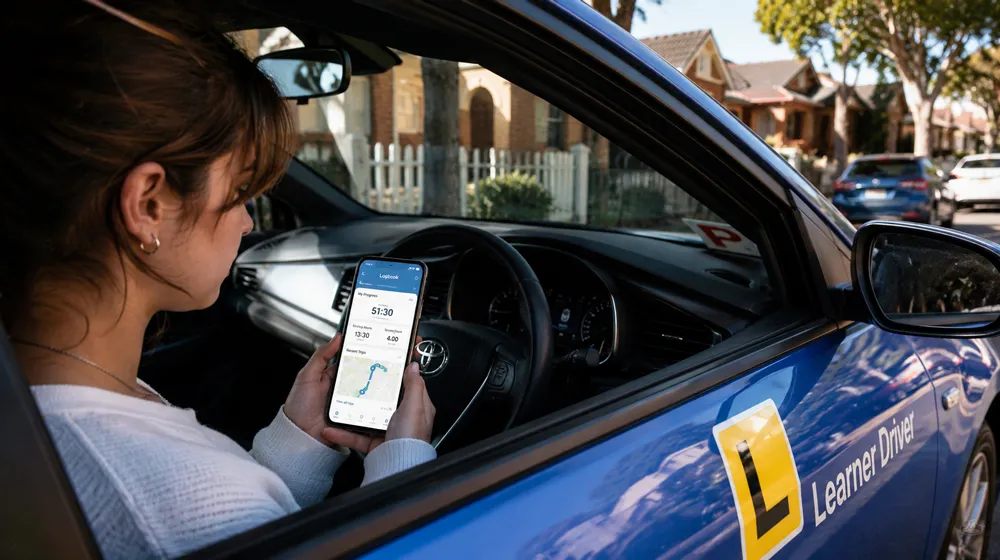
If you are learning to drive in Victoria, the official myLearners app gives you a digital way to record supervised drives, monitor your progress and manage supervisor approvals.
This guide explains the learner logbook requirements, how digital and paper records work, what to know about manual trip entries and how to use your practice hours to prepare for the driving test.
How Many Learner Driving Hours Do You Need in Victoria?
If you are under 21 when applying for your probationary licence in Victoria, you generally need to complete at least 120 hours of supervised driving practice, including 20 hours at night.
You must also meet the applicable learner permit period and other licensing requirements. Your exact obligations depend on your circumstances, so check the latest information from VicRoads before arranging your drive test.
Your logbook helps you record your practice and monitor your progress towards the required hours. Missing entries, incorrect totals or incomplete records can create problems when you prepare for your test.
Start with the official VicRoads guide to driving on your Ls for current learner requirements and logbook instructions.
Which Logbook Should You Use?
Victorian learner drivers can use the official myLearners app or a paper learner logbook to keep track of supervised driving practice. The best option for you depends on how you prefer to record your drives and manage your records.
1. myLearners – The Official Victorian App
The myLearners app is provided by VicRoads to help Victorian learner drivers and their supervisors record driving practice. It is a practical starting point if you want to manage your hours digitally rather than write every trip in a paper logbook.
To get started, you and your supervising driver need to download the app and create myVicRoads accounts. Follow the setup instructions to connect your accounts and begin recording drives.
Key features include:
- Digital recording of supervised driving hours.
- Supervisor review and approval of recorded drives.
- Progress tracking for your learner driving hours.
- Offline functionality when an internet connection is unavailable.
- Driving safety tips and learning resources.
- An option to transfer eligible existing paper logbook hours when you first set up the app.
The app can simplify record keeping, but you should still check that your entries are accurate and your supervisor has completed any required approvals.
Visit the official VicRoads mobile apps page to find current information about the app and its availability.
2. Paper Learner Logbook
A paper logbook is another option for recording supervised driving hours. It can suit learners who prefer writing down each trip or want a physical record of their progress.
However, you need to record your hours carefully and keep the logbook safe. Lost pages, incomplete entries or calculation mistakes can make it harder to confirm your progress.
If you plan to switch from a paper logbook to myLearners, follow the official transfer process. Do not throw away your original paper logbook after transferring your hours, because you may need it for verification before your drive test.
Digital Logbook vs Paper Logbook
| Feature | myLearners App | Paper Logbook |
|---|---|---|
| Recording hours | Digital recording | Manual recording |
| Supervisor approval | Digital review and approval | Follow the paper logbook instructions |
| Progress tracking | Digital progress tracking | Calculate and check totals manually |
| Internet access | Can work offline for supported functions | No internet required |
| Main consideration | Keep account access and entries up to date | Protect the physical logbook and complete it correctly |
Which should you choose? If you prefer digital tracking and supervisor approvals, myLearners is a practical option. If you prefer a physical record, a paper logbook may suit you better. Follow the current VicRoads requirements whichever method you use.
Can You Use a Paid Driving Logbook App?
You may come across third-party apps and services that offer driving-hour tracking, trip histories or other learner-driver features. However, features, subscription costs and compatibility with Victorian licensing requirements can differ between products.
Before paying for another app, check these points:
- Victorian requirements: Confirm whether the app supports the record keeping you need for your licence.
- Supervisor approval: Check how your supervising driver reviews and confirms each trip.
- Night driving: Make sure you can identify and track your night-driving hours.
- Manual entries: Find out what happens if your phone is unavailable or a trip is missed.
- Cost: Check whether the app is free, subscription-based or includes extra charges.
- Data access: Find out how you can retrieve your records if you change phones or stop using the service.
Do not assume that an app meets VicRoads requirements simply because it uses GPS or tracks driving time. Unless you can confirm that a third-party product suits your needs, the official myLearners app is a sensible place to start.
How to Record Driving Hours Manually
Manual trip entry can help when a learner cannot use the app during a drive, the app does not record a trip or a different eligible supervisor takes the learner for practice.
VicRoads sets specific limits for manual entries:
- A maximum of 10 hours out of the required 120 hours can be entered manually.
- Each manually entered drive can be no longer than two hours.
- Only a supervisor linked to the learner through myVicRoads can submit the entry.
- The supervisor must use their myVicRoads account. Manual trips cannot be submitted directly through the myLearners app.
Manual entry is intended as a backup option. The myLearners app remains the primary way to record and submit drives. Ask your supervisor to check the official process before entering a missed trip.
Read the official myLearners manual trip entry instructions for the latest steps and conditions.
How to Transfer Paper Logbook Hours to myLearners
If you have already recorded supervised driving hours in a paper logbook, VicRoads provides a process for transferring your completed hours to myLearners when you first log in.
Before starting, prepare these two totals:
- Your total completed driving hours, including day and night driving.
- Your completed night-driving hours.
Enter the correct figures when prompted. VicRoads states that the transferred totals cannot be edited later, so check your calculations carefully before submitting them.
Keep your original paper logbook. You may still need it for verification before your drive test. Do not dispose of it simply because you have transferred the totals to the app.
Check the official VicRoads learner-driver guide before transferring your records.
Six Tips to Keep Your Learner Driving Logbook Accurate
Recording your learner driving hours regularly can save you time and stress when your drive test approaches. Use these habits to stay organised:
- Record each drive promptly. Check the trip details instead of assuming the app captured everything correctly.
- Ask your supervisor to review trips. Make sure the required approvals are completed.
- Monitor night-driving hours. If the 120-hour requirement applies to you, keep track of your progress towards the 20-hour night-driving requirement.
- Check your totals regularly. Do not wait until the week before your test to discover missing entries.
- Keep your paper logbook when needed. Follow VicRoads instructions if you transfer records to the app.
- Practise a range of driving conditions. Build experience on residential streets, busier roads, intersections and in different traffic conditions.
A complete logbook is important, but the aim of supervised practice is to build the skills and judgement you need to drive safely on your own.
Does Completing 120 Hours Mean You Are Ready for the Drive Test?
No. Completing the required driving hours is one part of the licensing process. You must also meet the applicable licensing requirements and demonstrate safe driving during your practical assessment.
Before booking your test, practise the skills that examiners assess, including observation, mirror checks, speed control, road positioning, safe lane changes, intersection decisions and hazard awareness.
Our guide to Victorian road rules and driving test preparation can help you review the rules and practical skills you need to understand.
If you are preparing for the Pakenham East assessment, read our Pakenham VicRoads drive test guide for more information about test preparation.
Not sure how much professional practice you might need? Read our guide to how many driving lessons it may take to prepare for your drive test.
Automatic Driving Lessons in South East Melbourne
Supervised practice helps you build experience, while professional lessons can help you identify mistakes, improve specific skills and prepare for the practical driving test.
Start Driving School offers automatic driving lessons for beginners, nervous drivers and learners preparing for their VicRoads assessment in selected South East Melbourne suburbs.
Lessons can focus on observation, safe speed, lane positioning, intersections, roundabouts, parking and independent decision-making. Your instructor can also help you identify the areas that need more practice before test day.
Automatic Driving Lesson Prices
60-minute lesson: $65
Five-lesson: $300 ($60 per lesson)
Mock driving test: $75
Night driving lesson: $75
Drive test: $170, including the car and an accredited driving instructor for the test.
Free pick-up from home is available in Pakenham and Officer.
Find Driving Lessons Near You
Explore our local driving lesson pages:
- Driving Lessons in Pakenham
- Driving Lessons in Officer
- Driving Lessons in Berwick
- Driving Lessons in Narre Warren
- Driving Lessons in Hampton Park
Frequently Asked Questions
What is the official learner logbook app in Victoria?
The official app is myLearners, provided by VicRoads. It helps learner drivers record supervised driving hours, track progress and manage supervisor approvals.
Do all learner drivers in Victoria need 120 hours?
Learners under 21 generally need at least 120 hours of supervised driving, including 20 hours at night. Check the current VicRoads requirements for your age and circumstances.
Is myLearners free to use?
Check the official VicRoads app page for current availability and access information before downloading it.
Can I use a paper logbook instead of myLearners?
Yes. VicRoads provides a paper learner logbook as an alternative. Follow the current instructions for recording your hours and presenting your records when required.
How many hours can be entered manually?
Up to 10 hours of the required 120 hours can be entered manually, and each manually submitted drive can be no longer than two hours. A linked supervising driver must submit the entry through their myVicRoads account.
Can I transfer paper logbook hours to myLearners?
Yes. You can transfer your completed total hours and night-driving hours when setting up the app. Check your figures carefully before submitting them, and keep your original paper logbook for possible verification.
Is a paid logbook app better than myLearners?
Not necessarily. Compare features, prices, supervisor approval options and record requirements before paying for another app. Confirm that your chosen method suits the current Victorian licensing requirements.
Does completing 120 hours guarantee that I will pass my drive test?
No. You must meet the licensing requirements and demonstrate safe driving during your assessment. Regular practice, constructive feedback and a realistic mock test can help you identify areas that need improvement.
Start Building Your Driving Confidence
Choose a logbook method that suits you, record your supervised driving hours accurately and keep your records safe. Most importantly, use every practice drive to build the observation, judgement and vehicle control skills you will need after getting your licence.
If you want help preparing for your practical assessment, Start Driving School offers automatic driving lessons and drive test preparation in selected South East Melbourne suburbs.
Start Driving School
Automatic Driving Lessons and Drive Test Preparation
Official resources:
Driving on your Ls |
VicRoads mobile apps |
Manual trip entry instructions